
Auria Pro: Unrivaled. Again.
When Auria debuted, it astonished reviewers. "Brilliant, amazing and jaw dropping," said Music App Blog. "...anywhere but on an iPad it would sell for at least five times as much. It's really that good." said Recording Magazine. "We're stunned by what we see - and hear." said MacLife. "Simply put, there are no other apps available on the iPad that compete..." said Apps for Music Production. "Auria lives up to the hype. It is the real deal." said MusicRadar. Nominated for a TEC Award, Auria also won Editor's Choice from Electronic Musician.
Now Auria Pro raises the bar even higher, with comprehensive MIDI capabilities, real-time audio warping, powerful internal bus routing, audio quantizing, audio transient-to-MIDI conversion, groove templates, transient slicing, unlimited tracks, killer synths such as FabFilter's One and Twin2, plus WaveMachine Labs' own multi-format sampler, Lyra, and more.

MIDI Sequencing
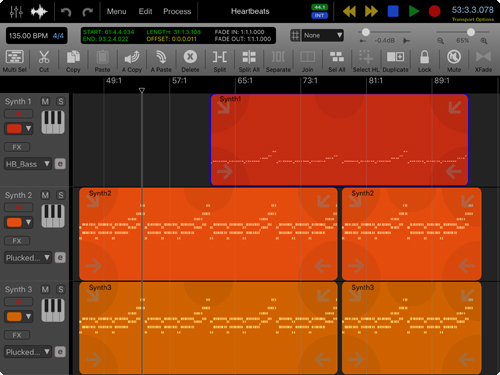
Auria Pro adds a complete MIDI sequencer, with a Piano Roll editor and real-time MIDI parameters like quantizing and groove templates. Record from external MIDI keyboards, or with third party iOS instruments that support CoreMIDI's Virtual MIDI.
Draw in tempo changes with Auria Pro's new Tempo and Time Signature editor. Process MIDI parts with over fifteen different MIDI processes, like transpose, legato, velocity compression, and many more.
WaveMachine Labs' Lyra
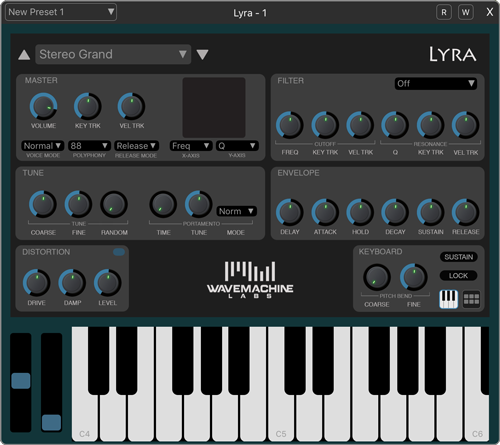
Lyra is a powerful sample playback system which supports SFZ, EXS and SF2 sample formats. Lyra is a true disk streaming sampler, so even large instruments like a 4GB piano will load with ease. Lyra supports all the SFZ opcodes, even obscure ones, and the EXS implementation is complete as well.
FabFilter Twin2
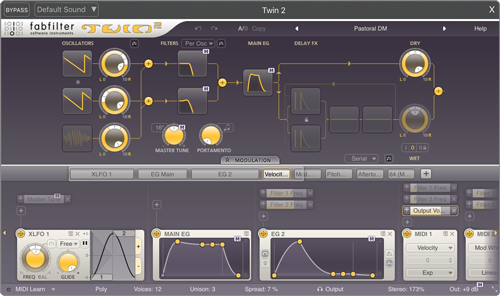
FabFilter Twin 2 is equipped with the best possible oscillators, award-winning filters and an innovative interface that makes sound design a breeze! Rather use presets? Twin 2 comes with tons of quality sounds that you can use right away.
With its innovative easy-to-use interface, programming Twin 2 is easy and fast. The what-you-use-is-what-you-see interface shows only what you are actually using, and the graphic component buttons give you direct access to the most important settings from the impressive list of features.
FabFilter One
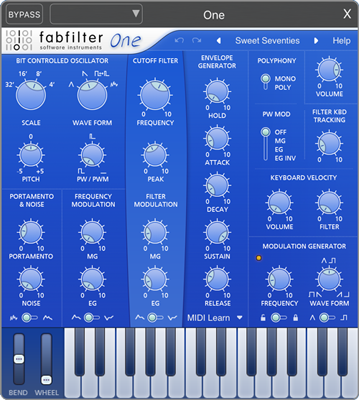
FabFilter One is a basic synthesizer with just one oscillator, but with perfectly fine-tuned controls and the best possible sound and filter quality. FabFilter has put tremendous effort in creating the best cut-off filter ever. Their new design approach has resulted in the fattest and smoothest self-oscillating digital filter you have ever heard. It has been tuned carefully to achieve the character and warmth of a classic analog synthesizer. FabFilter One’s filter sounds raw but never cheap or ‘digital’, even at full resonance.
The filter is fed by an equally high-quality solid-sounding oscillator, developed from scratch to be completely aliasing-free. It features sawtooth, triangle, and square wave forms with pulse width modulation.
The oscillator and the filter can be modulated by the LFO and the EG. The LFO offers triangle and square wave forms, with adjustable wave balance so any wave form between sawtooth and triangle can be selected. The EG has the usual ADSR knobs, but with a perfectly fine-tuned feel. Also, it has an additional Hold setting that extends the time keys are held down.
Real-time Audio Warping
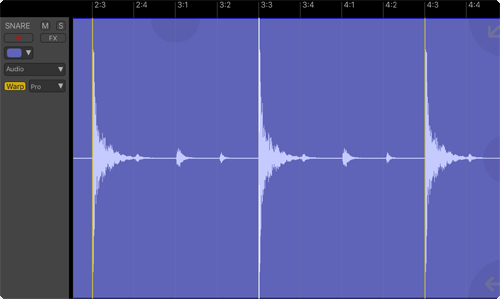
Included with Auria Pro is a real-time audio warping engine using élastique Pro v3, and utilizes transient detection to create warp markers that can easily be moved in time to change the rhythmic feel of audio recordings.
Automatically quantize audio using either warping or transient slicing, or extract the feel of an audio part and apply it to either audio or MIDI tracks by combining all of the above with groove quantizing! And Auria Pro's Audio to MIDI conversion turns audio drum parts directly into MIDI tracks.
More Flexible Mixing
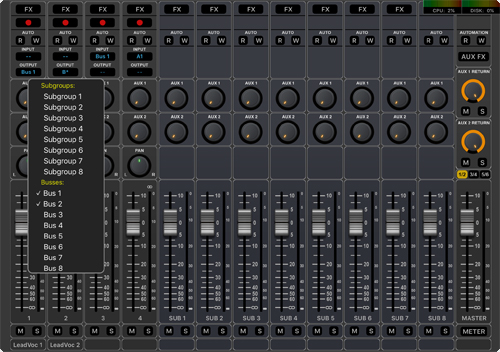
Make the jump to virtually unlimited tracks with Auria Pro. Combine that with six total Aux Sends instead of the previous two. And Auria Pro also adds an entirely new bus system, where up to 32 separate buses can be created and flexibly routed between tracks, auxes, and subgroups.
Piano Roll Editor
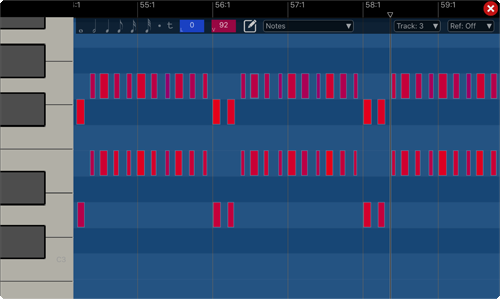
Edit MIDI parts using Auria Pro's Piano Roll editor. Move, add, delete, and change notes quickly and easily using Auria Pro's touch interface. Includes multiple modes for working with notes, with a rapid draw mode to instantly add new notes with just a finger.
Edit note velocity with a simple slide of a finger, and draw in or edit complex controller data using Auria Pro's control point system.
Record and Edit
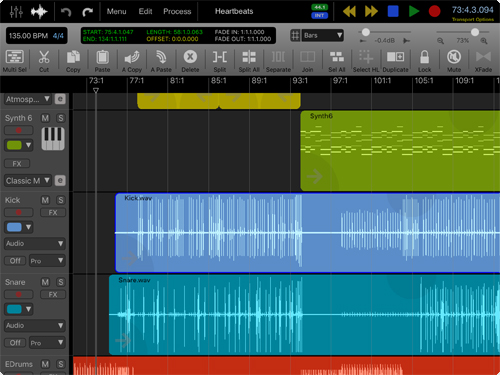
Auria Pro supports up to 24-input recording with compatible audio interfaces. Recording is as simple as choosing an input and pressing record. Auria lets you set input levels and choose to monitor tracks with or without effects. Auria’s powerful touch-based editor enables complete control over your music, with functions like Cut, Copy, Paste, Duplicate, Split, Join and more. Bring in audio from other apps. Or sessions from Pro Tools, Nuendo, Logic, Digital Performer or other DAWs via AAF import. Optional plugins like Drumagog even lets you fine-tune your drum tracks.
Mix
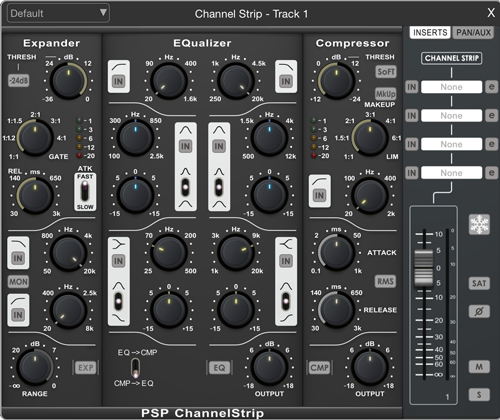
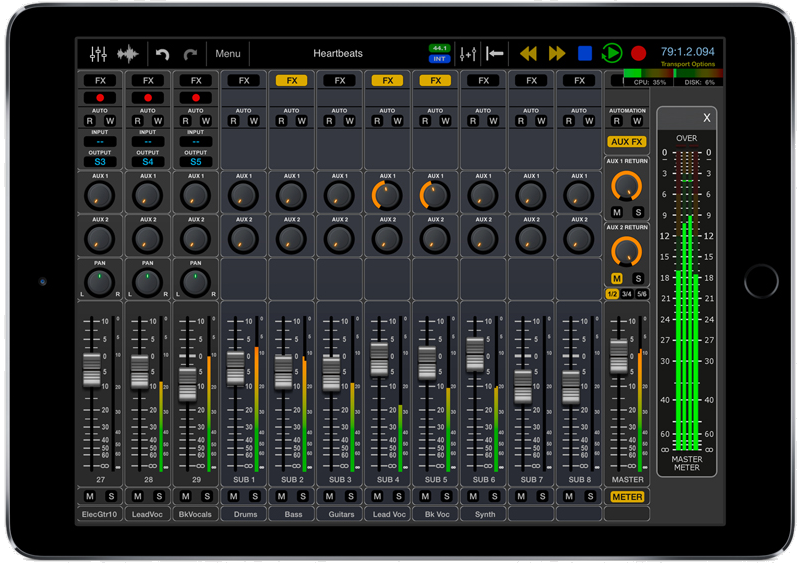
Turn your iPad to portrait orientation for 100mm long-throw faders controlling virtually unlimited mono or stereo tracks, each with six aux sends, and a PSP ChannelStrip with extensive EQ, expansion, compression and gating controls.
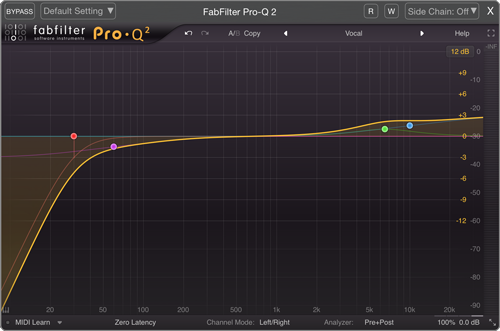
In addition, you can add up to four effect plug-ins to each channel. Do some frequency tweaking with the optional FabFilter Pro Q 2; or get an analog sheen with the optional PSP MicroWarmer.
On top of that are eight subgroups and flexible buses, each of which can also accept four plug-ins. With full automation for both channel controls and plug-ins, Auria’s 64-bit mixing power is unsurpassed on the iPad.
Effects
Superb ambience effects come with Auria, including Convolution Reverb featuring IR samples from MoReVox, ClassicVerb, PSP StereoChorus and PSP StereoDelay.
Optional plug-ins include PSPaudioware's Echo and Micro Warmer, the full suite of FabFilter effects like Pro-Q2, Pro-C2, Pro-L and Pro-MB, Overloud's THM plugin, FXpansion's DCAM effects, and more. And because WaveMachine Labs is helping plugin manufacturers port their existing plugins to the iOS platform, more plugins will be available through In-App purchase.
Master
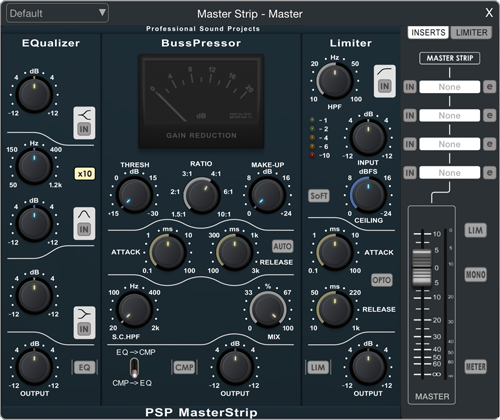
Auria dazzles right through to final mixdown with the included PSP MasterStrip, featuring EQ, compression, and brick-wall limiting.
And because it all goes through Auria’s 64-bit Double-Precision summing engine, there’s plenty of headroom to prevent clipping.
Output as an .m4a or .wav file, use Audio Copy/Paste, or output directly to iTunes, Soundcloud, or Dropbox. Or export an AAF session which you can bring into Pro Tools, Nuendo, Logic, Digital Performer or other DAWs.
From the first input to the final mixdown, Auria’s stunning sound-sculpting tools and pristine audio reproduction will transform your iPad into an audio wonderland you simply won’t want to do without.
External Hard Drive Support
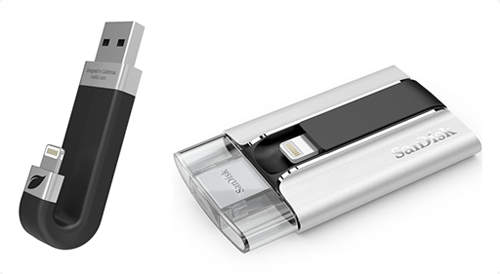
Auria Pro introduces support for iOS-compatible external hard drives. Using Auria Pro's new Save Project to other App feature allows you to backup and restore your Auria projects to external media with just a few taps.
Introducing Auria Pro
Full Auria Pro Feature List
Recording and Playback:
- Sample rates of 44.1KHz, 48KHz and 96KHz
- 24-bit recording
- Unlimited tracks
- Up to 24 tracks of simultaneous recording when used with compatible audio interfaces
- Full delay compensation on all tracks, subgroups, buses and aux sends
- Auto-punch recording mode
- Adjustable metering modes, including pre or post fader, RMS and peak
- AAF import and export allows transferring audio sessions between popular DAWs like Logic, Pro Tools, Nuendo, Samplitude and more
MIDI and audio editing:
- Comprehensive MIDI sequencer
- FabFilter One and Twin 2 synths included
- WaveMachine Labs' Lyra, a multi-format sample player, included
- Real-time audio warping using élastique Pro v3
- Piano roll editor
- Tempo and time signature tracks
- Audio quantizing with warp and slicing modes
- Transient slicing
- Audio transient-to-MIDI conversion
- Real-time MIDI parameter control including quantize, velocity shift, velocity compression, length compression, random, delay, legato and transpose
- MIDI processing functions including Crescendo, Delete Controllers/Notes, Fixed Length, Fixed Velocity, Humanize, Legato, Optimize Controller Data, Pedal to Length, Restrict Polyphony, Reverse, Transpose, Velocity Compress/Limit, Velocity Gain, Velocity Range, and Velocity Rescale
- Groove template quantizing with built-in DNA grooves from Numerical Sound (additional grooves available for purchase)
- MIDI Sync support with MIDI Time Code, MIDI Clock and MMC
- MIDI Remote Control (Mackie MCU and HUI protocol)
- Touch-based waveform editor with cut, copy, paste, split, join, crossfade, duplicate, separate, gain, normalize, DC offset, reverse, and more
- Timeline ruler options include Minutes:Seconds, Bars:Beats, Samples and SMPTE time
- Ripple-edit mode
- Real-time audio scrubbing
- Built-in metronome
- Flexible snapping tools allow snapping to events, cursor, bars, beats, fractional beats, markers, locators, transients and SMPTE frames
Mixing, processing and effects:
- 64-bit double-precision floating point mixing engine
- 8 assignable subgroups and 6 aux sends
- Powerful internal bus routing with up to 32 buses and support for multiple destinations
- Direct Outputs
- Full automation support on all controls with graphical editing
- Vintage-inspired ChannelStrip by PSPaudioware on every channel includes Gate, Expander, Multi-band EQ and Compressor
- MasterStrip on all subgroup and master channels featuring PSPaudioware BussPressor, EQ and Mastering Limiter
- Convolution reverb plug-in with bundled IR library included
- ClassicVerb reverb plug-in included
- PSPaudioware Stereo Delay plug-in included
- PSPaudioware Stereo Chorus plug-in included
- Third party effect plugin support available via in-app purchase by companies including FabFilter, FXpansion, Overloud, BIAS and more
- Tempo sync and side chain support for plug-ins
- Track freeze and bounce-in-place for minimizing CPU usage
- True 100mm faders when used in Portrait Mode
- Adjustable pan laws
And more:
- External hard drive support
- Project template support
- Project snapshots
- Automatic sample rate conversion
- Audio Units, Inter-app Audio, and Audiobus support
- DropBox, SoundCloud, AudioShare, and Audio Copy/Paste support
- Optional video import feature allows sample accurate sync of video to an Auria project. Adjustable offset times and video export capability
- WIST support for wireless syncing of other compatible music apps
Comparison of Auria and Auria Pro
|
Auria |
Auria Pro |
|
|
MIDI Sequencing |
No |
Yes |
|
Piano Roll Editor |
No |
Yes |
|
Lyra |
No |
Yes |
|
FabFilter Twin2 and One |
No |
Yes |
|
Real-time Quantize Engine |
No |
Yes |
|
Groove Templates Quantize Engine |
No |
Yes |
|
Tempo and Time Signature Track |
No |
Yes |
|
Real-time Audio Warping |
No |
Yes |
|
Audio Quantize |
No |
Yes |
|
Transient Detection and Slicing |
No |
Yes |
|
Flexible Bus Routing |
No |
Yes |
|
External Hard Drive Support |
No |
Yes |
|
Direct Outputs |
No |
Yes |
|
Auxiliary Sends |
2 |
6 |
|
Tracks - Playback |
Unlimited |
Unlimited |
|
Project Templates |
Yes |
Yes |
|
Offline Time Stretching |
Yes |
Yes |
|
Sample Rates |
44.1/48/96 |
44.1/48/96 |
|
Track Freeze |
Yes |
Yes |
|
AAF Project Import and Export |
Yes |
Yes |
|
MIDI Sync |
Yes |
Yes |
|
Convolution Reverb |
Yes |
Yes |
|
Vintage-inspired ChannelStrip from PSP |
Yes |
Yes |
|
PSP MasterStrip |
Yes |
Yes |
|
Price |
$24.99 USD |
$49.99 USD |
Owners of Auria and Auria LE can upgrade to Auria Pro through the in-app store.
Compatibility
iPad 4 or later recommended; iOS 6.1 or later required. Auria will record from the iPad mic, but a compatible USB Class 2 audio interface and Camera Connection Kit is recommended. Auria Pro supports CoreMIDI compatible MIDI interfaces. Some plug-ins are optional, as noted.
* All Trademarks recognized as property of their respective owners